The Fortune Teller
- Create 4 text input boxes. Label them number of children, partner's name, geographic location, job title.
- Add a button labeled "Tell Me My Fortune!"
- Create an empty div with the id #fortune where your fortune will go
- Add a click event to the button, so that clicking the button will put "You will be a X in Y, and married to Z with N kids." in the #fortune div
The Age Calculator
- Create a text box for a user to enter their birth year
- Create a button that says "How old am I?"
- Create an empty div with the id #age
- Add a click event, so when the user clicks the button, it calculates their two possible ages and says "You are either NN or NN" in the #age div
The Lifetime Supply Calculator
- Create 2 text boxes - one for the user's current age, and one for the # of snacks they eat per day
- Create a button that says "How many snacks?"
- Create an empty div with the id #snacks
- When the user clicks the button, calculate how many snacks they would eat total for the rest of their life (assuming a max age of 100), and print "You will need NN to last you until the ripe old age of X" in the #snacks div.
Grade Calculator
- Create a text box where a user can enter a score (a number)
- Create a button that says "Grade Me!"
- Create an empty div #grade
- When the user clicks the button, it should output a letter grade from A-F in the #grade div
Bonus: Cash Register
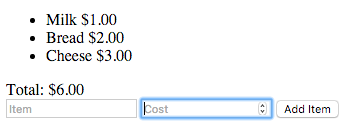
- Create two text boxes for the user to enter an item name (string) and a price (number)
- Create a button that says "Add Item"
- Create two divs
- #itemList and underneath it, a div that looks like this:
<div>Total: $<span id="cost"></span></div>
- Every time the user adds an item, append the name and the price to the #itemList, and update the cost in #cost
Hint: You may need to use parseFloat() to turn some strings into numbers!